Online Boardview (.brd, .tvw) & KiCad (.kicad_pcb) Viewer
DEADBOARD opens boardview and KiCad PCB layout files straight in your browser — nothing to install, and your files stay local on your machine (nothing is uploaded to a server). Unlike a static boardview reader, DEADBOARD also extracts the power tree from the netlist and simulates the board with a SPICE-style solver so you can probe nets, trace rails, and export an ngspice netlist.
Have a board file ready? Open the bench and drag-and-drop your
.kicad_pcb,.brd,.tvw, or.pcbfix.jsonfile straight onto the canvas.
Supported board, BOM & schematic formats #
| File type | Extensions | What DEADBOARD reads |
|---|---|---|
| KiCad PCB layout | .kicad_pcb |
Board outline, Top/Bottom copper & inner planes, thermal reliefs, pads, vias, footprints, silkscreen, DNP flags, values, and netlist |
| TopTest / OpenBoardView | .brd |
Both plain-text and standard obfuscated TopTest/OpenBoardView .brd layouts (Format, Parts, Pins, Nails) |
| BRD2 boardview | .brd |
BRDOUT, NETS, PARTS, PINS, and NAILS sections (with Top/Bottom placement and pin ranges) |
| Tebo-ICT boardview | .tvw |
Layers, net names, Top/Bottom parts, real pad shapes, rotations, plated holes, printed values, and routed board outline |
| Bill of Materials (BOM) | .csv, .tsv |
KiCad, Altium, OrCAD, EasyEDA, Eagle, JLCPCB/PCBWay tables (RefDes, Value, MPN/LCSC, DNP, Footprint, Description) |
| Schematic | .pdf, image |
Displayed side-by-side next to the board while you probe (and bundled inside mods) |
| DEADBOARD challenge | .pcbfix.json |
Complete board + planted faults + test-bench objectives + topology-locked flag |
What you can do with an imported board #
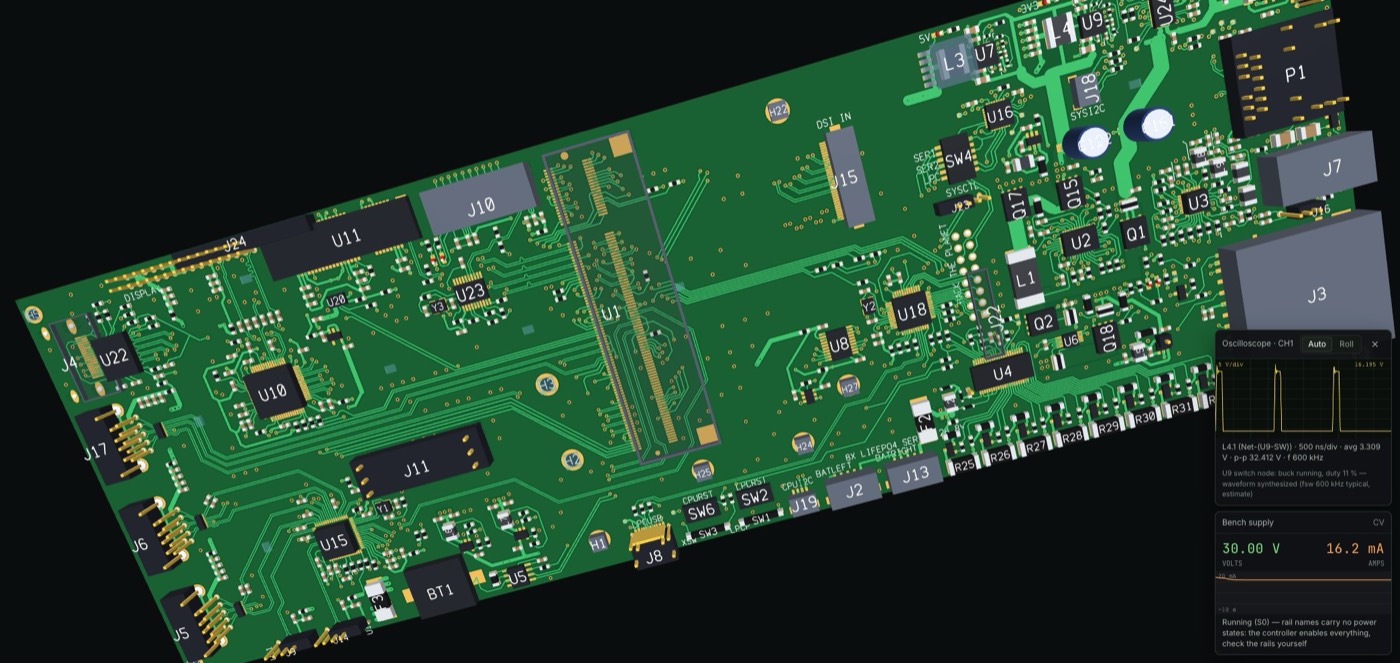
- Inspect in 2D or 3D orbit (
Fto flip, Both sides): Switch between Top, Bottom, Both sides, Realistic, Voltage map, Thermal, and X-ray views to see through multilayer copper. - Trace nets across layers (
1Select): Click any pad, pin, or component to highlight every pad and via sharing that net across both sides of the board, and search hundreds of reference designators in a keystroke. - Read BOM & schematics side by side: Attach a CSV/TSV BOM to enrich missing component values and part numbers, and keep the schematic open next to the boardview while probing.
- Simulate & export SPICE (
.cir): Under Bench → Solver, choose SPICE or SPICE + PWR so DEADBOARD detects regulators and power states from the netlist and net names — or press Export SPICE netlist (.cir) to run the same circuit inngspice. - Turn your board into a repair lab or mod: Use the Author tab to plant realistic faults (cold joints, dead-short MLCCs, drifted resistors, intermittent cracks), lock a challenge flag, and export as a
.pcbfix.jsonor shareable.zipmod.
How to open a boardview or KiCad file in 30 seconds #
- Open the DEADBOARD bench in Chrome, Edge, Safari, or Firefox.
- Drag and drop a
.kicad_pcb,.brd, or.tvwfile anywhere onto the bench window. - Click any component or pad to highlight its net, press
Fto flip between Top and Bottom, or switch to 3D to orbit around connectors and through-hole pins. - (Optional) Drop a matching
.csvBOM to fill in part values and manufacturer part numbers, or open Bench → Export SPICE netlist (.cir).
Try real open-hardware boards right now #
No board file handy? Open any of these real KiCad boards already loaded in DEADBOARD:
- MNT Reform 2 laptop mainboard (522 parts)
- Antmicro Jetson Nano baseboard (369 parts)
- Rana Tadpole V2 RP2040 controller (147 parts)
- Olimex ESP32-DevKit-LiPo (50 parts)
Frequently asked questions #
Are my .brd, .tvw, or .kicad_pcb files uploaded anywhere? #
No. DEADBOARD is a static web application with no backend server. All file parsing, 2D/3D rendering, and SPICE solving run locally inside your browser tab.
What if my .brd file is an Eagle or Allegro binary file? #
.brd is shared by several unrelated EDA tools. DEADBOARD supports TopTest / OpenBoardView .brd (both plain-text and obfuscated), BRD2 .brd, Tebo-ICT .tvw, and KiCad .kicad_pcb. Proprietary binary CAD files (such as Cadence Allegro or older binary Eagle .brd) are not supported directly; export them to KiCad or a supported boardview format first.
Can I calibrate the simulator against measurements from a real physical board? #
Yes. DEADBOARD lets you compare simulated node voltages and currents against bench readings from a physical board and calibrate load scaling against your measurements.